

RealtorFlow
Real estate agency CRM for leads, calls, inventory, and team performance
Platforms: Web · Android
Problem
Agencies lose deals when follow-ups live in chat threads, inventory sits in spreadsheets, and owners cannot see who dialed or who closed.
Solution
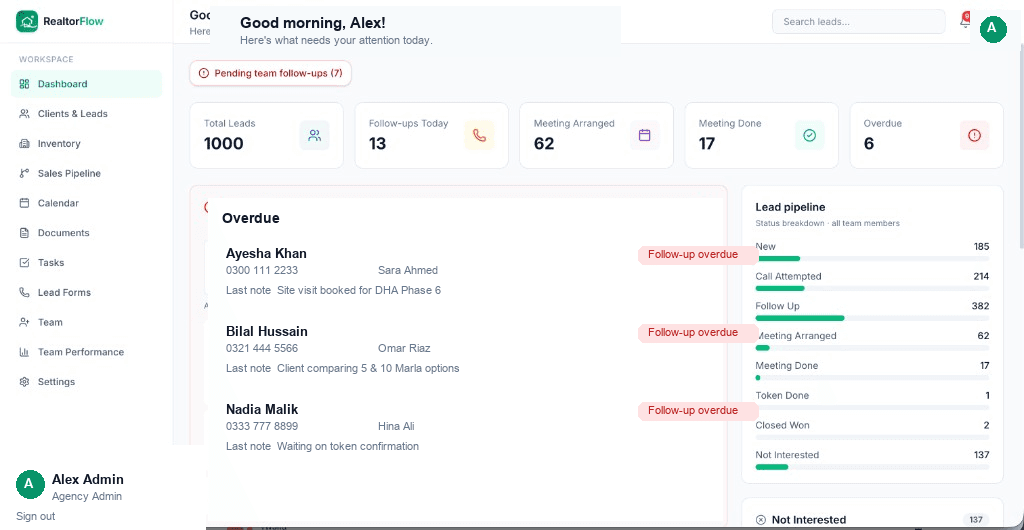
One workspace for owners and agents: overdue alerts, an 8-stage real estate pipeline, inventory, calendar, auto tasks, call logging with AI notes, documents, and Team Performance reports on web and Android.
RealtorFlow is the CRM for real estate agencies. Manage leads from first dial to close, log calls with AI summaries, track inventory, calendar, tasks, documents, and see who on your team is performing.
Use cases
Real flows inside RealtorFlow, from first open to paid actions.
- case_01
Agency owners
Monitor pending follow-ups, unassigned leads, and agent rankings without chasing chat threads.
- case_02
Sales teams
Call, schedule, update status, attach meeting photos, and clear tasks from web or Android.
- case_03
Inventory ops
Keep Available, Showing, and Sold listings next to the leads who care about them.
- case_04
Accountability
Team Performance tracks dials, meetings, tokens, closed won, notes, and status updates by date range.
Tech stack
Mobile, native, web, AI, and backend pieces that ship in production.
Web
- ▸Next.js
- ▸TypeScript
- ▸Supabase
Mobile
- ▸Flutter
- ▸Android
Ops
- ▸Vercel
- ▸Push notifications
- ▸Lead forms
- ▸AI summaries
Payments & subscriptions
How RealtorFlow charges, unlocks Pro, and handles money in-app.
Model
Invite-only agency SaaS
Payments
- ●Invoice
- ●Custom agency plan
Subscription
Per agency workspace with seats for agents
Workspaces are provisioned for agencies. Contact ShipCrzy for onboarding, seats, and Android rollout.
Highlights
- ▸Dashboard with overdue follow-ups and pipeline breakdown
- ▸Clients and leads with filters, assignment, and reminders
- ▸Call logging, recording, and AI call summaries
- ▸Inventory, calendar, tasks, documents, and team reports
- ▸Pipeline stages through Token Done and Closed Won